Featured

prabuddha. Powered by Blogger.

addhitz

Showing posts with label GizmoELECTRONICS. Show all posts

2 HP Photosmart e-All-in-One Printer - D110a


The good: The HP Photosmart e-All-in-One D110a's interactive touch screen adds Web connectivity to the standard print, copy, and scan functions, at a lower price than other HP ePrint-connected devices.

The bad: Print speeds are languid and the smaller paper input capacity makes it a hassle to refill for bigger households. You also must have a wireless connection to use the D110 to its fullest potential.

The bottom line: We wouldn't recommend it for high-output households or large offices, but the HP Photosmart D110a provides inexpensive access to HP's clever new ePrint and Web-connected apps.

The HP Photosmart e-All-in-One D110a wireless printer reaches beyond the standard print, copy, and fax functions of the typical multifunction output device to add ePrintCenter, Hewlett-Packard's ePrint remote printing service that gives access to downloadable content. Priced at $100, the D110a is a less fancy version of the HP Envy 100 with the same two-ink cartridge bay and a smaller 2.4-inch LCD touch screen. Although we're disappointed by its print speeds and other mechanical missteps, the HP Photosmart D110a is an affordable printer with useful Web-connectivity features for families, travelers, and business professionals.

Design and features
At 17.4 inches wide, 15.9 inches deep, and just 7.1 inches tall, the HP Photosmart D110a takes up so little real estate on your desktop that others might mistake it for a single-function inkjet. In fact, the printer has a copier and a flatbed scanner that tucks neatly into the top of the unit, and the rest of the front panel is limited to a paper tray, a memory card reader, and a 2.3-inch color touch screen LCD on the left with virtual buttons surrounding it that control the typical menu functions.

In terms of general printing functionality, the D110a is limited in two ways that you should consider before buying it: first, the media reader just underneath the display can only read Secure Digital (SD) and MultiMediaCard (MMC) storage cards and there's no available USB port for direct camera connections. That means Sony Memory Stick and Compact Flash card users are forced to use a computer to transfer photos for printing.

Second, the D110a works best for low-output work stations, as the printer has an 80-sheet paper input tray and a maximum monthly output capacity (also called a "duty cycle") of 1,000 pages. If you know you'll be printing a high volume of documents, you'll find yourself wishing for competing printers like the Lexmark S405 that hold up to 135 sheets of paper and can print over 5,000 pages a month.

We also wish you could adjust the angle of the touch screen, which instead is fixed in place, but we'll let that slide. The home screen has a set of scrollable icons for your favorite applications as well as four shortcut buttons at the bottom to bring up controls for photo printing, copy, scan, and fax. You can drag your finger across the list of apps to select one, delete ones you don't use, or download any apps from the growing list in the ePrintCenter.

The touch screen works well enough, although entering router passwords and other lengthy content on the small screen will certainly test your patience, and we also found the touch screen less sensitive than we like; it's not as responsive as the Apple iPhone, for example, and the touch delay sometimes causes unintentional button presses, although it's not nearly as frustrating to use as the e-Print-enabled HP Photosmart Premium e-All-in-One C310a, which omits all hard-button controls in favor of a clumsy touch screen.

The back of the printer is equally spare, with only a USB connection on the left and a thin power cord on the right--there's no wired Ethernet port available. Instead, HP offers a USB port for a wired connection to a host computer, or you can alternatively connect wirelessly with the built-in 802.11b/g/n print server inside, making it necessary to use both the ePrint feature and HP's ePrintCenter app store.

HP ePrintCenter
HP requires the printer and the host computer to access the Internet on the same wireless router to take advantage of the ePrintCenter apps, so you get no wired Ethernet port option. You do get the option to install the printer via the USB port on the back, but you'll be limited to the printing functions.

The ePrintCenter is an online hub where you can view job history, change settings, add printers to your account, browse and install apps, and cancel print jobs. All of the extra applications are free and HP breaks them down into categories within the App Store: entertainment, home, kids, news/blogs, photo, and tickets. Each one promises to streamline the printing experience by offering shortcuts to your favorite coupons, news articles, weather reports, recipes, and so on. HP tells us that it plans to release a Software Development Kit (SDK) in the near future so that software engineers can design their own shortcut apps for the store.

Using the onscreen Wireless Setup Wizard, we were able to connect the printer through CNET's protected network and took off browsing in less than 10 minutes. The Get More button took us directly to the store, where you can rate each app and even add comments for other potential users to read. The apps have potential, but prepare to battle long load times that require you to navigate through several submenu layers.

For example, the Google Maps app is an intriguing idea that could save time, but the touch-screen delays and irritatingly small virtual keyboard kept us in hunt-and-peck purgatory for so long that we began longing for the convenience of a simple keyboard and mouse for navigation. Another example is the Fandango Ticket function: we thought the process would be as simple as using the kiosks offered in actual theaters, but searching for movies and show times in the correct theater is hard enough to do online without waiting for a tiny map and listing to show up on a 2.4-inch screen.

HP ePrint
The D110a works with any modern Windows or Mac computer, but with ePrint you can also print from mobile devices like tablets or smartphones that don't have a USB port to connect with a traditional printer. ePrint bypasses this issue by enabling you to send jobs directly to the printer using a unique e-mail address. With that address, you can print from virtually any device that can send out messages.

It's important to note your home networking situation prior to buying the D110a, as you absolutely need a wireless network to take advantage of ePrint and the multitude of apps available for download--remember, the D110a has no Ethernet port. The first part of the ePrint setup process is to connect the D110a to your wireless network using the printer's Wireless Set Up Wizard. Once you establish a wireless connection and establish a partnership with your home computer (note that the printer and computer must be use the same wireless router), you can enable Web Services through the printer's settings menu, at which point the D110a will print a document with the unique ePrint e-mail address that identifies your printer to HP and lets you begin downloading applications through the ePrintCenter.


Read more

0 LG LW5600 review: Passive 3D TV, but better with 2D

LG's passive 3D-equipped LW5600 delivers solid 2D picture quality.

(Credit: Sarah Tew/CNET)

By now you may've heard all about passive 3D, how it might or might not be better than active, how LG/Vizio and Samsung/Sony/Panasonic are at each others' throats trying to convince buyers to choose one over the other, and how 3D TV is here to stay. That's all true, and documented exhaustively in our 3D TV FAQ, but in our experience few TV shoppers care about 3D in the least. If you're one of the few, then you'll want to know that overall we like the picture quality of active better than what we've seen of passive from the LG LW5600 series--although passive definitely has its advantages.

That said, we can forget about 3D and focus on what really matters: 2D picture quality, where the LW5600 is one of the best edge-lit LED TVs we've tested. The dimming backlight, despite its flaws, is an asset overall (and no, it's not available on less expensive, 2D-only 2011 LGs) along with best-in-class color. Perhaps most importantly, the LW5600 has a matte screen that performs better than glossy screens in bright rooms. We liked LG's Internet features and even its funky remote this year, although buyers seeking a style statement will be disappointed. The LG LW5600 costs more than most LED-based LCD TVs, but it offers the complete package and deserves consideration. from buyers in this price range regardless of how they feel about 3D.


The good: The LG 47LW5600 evinced excellent color in bright and dark areas, along with relatively deep black levels and even screen uniformity for an edge-lit LED-based LCD TV. Its matte screen works well in bright rooms. The Smart TV Internet portal is well-designed with a solid selection of streaming services, and the motion-sensitive remote provides a cool, easy-to-use secondary control option. Passive 3D on this TV has minimal crosstalk, is brighter than active, and LG includes four pairs of lightweight, nonpowered glasses.


The bad: This LG LED TV is relatively expensive. Its edge-lit local dimming LED scheme produces some artifacts and blooming; highlights were somewhat muted in dark scenes; and even from off-angle the picture loses contrast worse than most such TVs. The LW5600's Smart TV lacks Hulu Plus and Pandora, and its search is next to useless. Passive 3D shows a softer image with more artifacts and worse overall quality than active.

The bottom line: While passive 3D has its flaws, the LG LW5600's 2D picture quality is very good for an edge-lit LED-based LCD TV, especially in bright rooms.


Read more

0 Panasonic Lumix DMC-ZS10 (Black)


The good: The Panasonic Lumix DMC-ZS10 has fast shooting performance and an extensive feature set.

The bad: The Panasonic Lumix DMC-ZS10 has a near-pointless touch screen; no raw capture option; noisy photos; and a short battery life.

The bottom line: The Panasonic Lumix DMC-ZS10 is a very good compact megazoom as long as you don't mind paying more for features and speedy performance than photo quality.

One of the few segments of point-and-shoots that's growing is megazooms, a category that Panasonic pretty much started. Now all manufacturers have them, though, so trying to stand out isn't easy. So for the Lumix DMC-ZS10, the update to 2010's ZS7, Panasonic did what most manufacturers do: made the lens wider and longer, kept the body size the same, and packed in a ton of features.

The basic specs include a 24mm-equivalent wide-angle lens with a 16x zoom (with nano coating to reduce ghosting and flare), a 3-inch, 460K-dot resolution touch-screen LCD, and a 14-megapixel MOS sensor. The sensor is the same type that's found in its top full-size megazoom, the FZ100, and it's paired with Panasonic's Venus Engine FHD processor. This combo allows for high-speed burst shooting--full resolution at 10 frames per second--and full HD movie capture in AVCHD format among other things.

For all its features, though, its photo quality is no better or worse than other recent high-end Panasonic point-and-shoots I've tested. Like those cameras, whether you'll like the photo quality from the ZS10 comes down to how you'll use the photos and how much cropping and enlarging you hope to do.

Key specs Panasonic Lumix DMC-ZS10
Price (MSRP) $399.95
Dimensions (WHD) 4.1 x 2.3 x 1.3 inches
Weight (with battery and media) 7.7 ounces
Megapixels, image sensor size, type 15 megapixels, 1/2.3-inch MOS (14 megapixels effective)
LCD size, resolution/viewfinder 3-inch touch-screen LCD, 460K dots/Electronic
Lens (zoom, aperture, focal length) 16x, f3.3-5.9, 24-384mm (35mm equivalent)
File format (still/video) JPEG/AVCHD (.MTS); Motion JPEG (.MOV)
Highest resolution size (still/video) 4,320x3,240 pixels/ 1,920x1,080 at 60fps (interlaced; 17Mbps), 1,280x720 at 30fps (progressive; 17Mbps)
Image stabilization type Optical and digital
Battery type, CIPA rated life Li-ion rechargeable, 260 shots
Battery charged in camera No; external charger supplied
Storage media SD/SDHC/SDXC
Bundled software PHOTOfunSTUDIO 6.1 HD Lite Edition (Windows); Super LoiLoScope trial version (Windows)

With plenty of light, the camera can turn out very good photos, if a little soft. When viewed at full size, there is noise present even at ISO 100. The higher the ISO, the more noise you'll see and the softer your photos get. Yellow blotching from noise is a particular problem with Panasonic's JPEG processing and it's present in varying degrees through its ISO range. It's most visible at ISO 1,600, which pretty much makes that ISO unusable. Panasonic seems to correct for the blotches at ISO 400, but in the process destroys fine detail and makes subjects look smeary. In the end, the ZS10 is best suited for outdoor use or indoors if brightly lit. Photos at or below ISO 200 can stand up to some cropping or larger prints, but low-light photos are best left for small prints and Web use. And unfortunately, with no option for raw capture, you're stuck with Panasonic's image processing.

Sample photos: Panasonic Lumix DMC-ZS10
Sample photos:
Panasonic Lumix DMC-ZS10

While there is little sign of pincushioning when the lens is extended, the wide end of the lens shows some barrel distortion. The lens has good center sharpness and is reasonably consistent edge to edge. Fringing in high-contrast areas can be a bit of an issue for the ZS10. Mainly, it's more than I'm used to seeing from a Panasonic camera, but still average for this class of camera.

Color and exposure is very good from the ZS10 up to ISO 400. Subjects appear natural, bright, and pretty accurate. Plus, there are a number of ways to tweak your color results. White-balance presets are good for the most part; however, the auto white balance is not good indoors. Unfortunately, you're stuck with that setting if you're using Intelligent Auto. Whenever possible, use the presets or take a manual reading, which is really easy to do.

Lastly, though the sensor is 15 megapixels, the camera only uses 14 megapixels, making it possible to have four aspect ratios--16:9, 3:2, 4:3, and 1.1--with the same angle of view across the entire zoom range of the lens.

As for movie quality, its AVCHD clips are sharp with good exposure and color and some of the smoothest motion I've seen from a point-and-shoot. Low-light recording suffers from the same noise problems as in photos. The zoom does operate while recording, but its movement is picked up by the stereo mic. If you are recording in a very quiet environment, you will hear it in your movies, but otherwise it's difficult to hear. The camera also has an option for continuous AF for movies, which performed very well, as did its wind noise filter. Also, the ZS10 can capture 3.5-megapixel photos while shooting video as well as extract single frames for photos when in Playback mode.

General shooting options Panasonic Lumix DMC-ZS10
ISO sensitivity (full resolution) Auto, 100, 200, 400, 800, 1,600
White balance Auto, Daylight, Cloudy, Shade, Incandescent, Manual
Recording modes Intelligent Auto, Program, Aperture Priority, Shutter Priority, Manual, Custom, MySCN 1 and 2, 3D, Custom, Movie
Focus modes Face Detection AF, 1-point AF, 1-point AF (high speed), 23-point AF, Spot AF, AF Tracking, Touch AF
Macro 1.2 inches (Wide); 3.3 feet (Tele)
Metering modes Multi, Center-weighted average, Spot
Color effects Standard, Black & White, Sepia, Cool, Warm, Happy (only in iA mode)
Burst mode shot limit (full resolution) 15 shots

As Panasonic's highest-end compact megazoom, there is no shortage of shooting options. For automatic shooting there is the company's Intelligent Auto that combines an ever-growing number of technologies to get the best results. Overall, it works very well, but photos can end up appearing overprocessed when viewed at full size. There are 29 scene modes for those times when you want to get specific with your auto shooting or get creative and you can store two favorites to MySCN spots on the mode dial. For the most part they are the ones you'd find on any point-and-shoot, but there are a few artistic ones like High Dynamic and Pinhole as well as a Handheld Night Shot that takes 10 pictures in a row and then combines them into one to reduce motion blur and noise. The down side is that it only works if your subject is stationary. There is an Underwater mode as well, but you'll need a casing if you want to get it wet--the ZS10 is not waterproof in any way. Lastly, many of the scene modes are available for movies, too, giving you a little more freedom to experiment.

For those who like to take more control, the ZS10 does offer aperture-priority, shutter-priority, and manual shooting modes. Apertures are f3.3-6.3 wide and 5.9-6.3 telephoto. Shutter speeds go from 60 seconds to 1/4,000 second. To use them, you press the Exposure button on back, and change the settings with the directional pad. (A thumb dial would've been nice, but space is already pretty tight.) There is also a Custom spot on the mode dial for setting up three custom setting configurations. There's a Program mode, too, should you want to adjust things like ISO, white balance, and exposure compensation (not done with the Exposure button, mind you, but the directional pad), but not worry about shutter speed and aperture settings.

If you shoot a lot of moving subjects, namely children, pets, and sports, the ZS10's multiple burst shooting options give you a lot of flexibility and a fighting chance of getting a good photo. Its fastest burst modes--40 and 60 frames per second--are at reduced resolutions, but Panasonic packed in three at full resolution. There's one that captures up to 15 shots at 10fps, but that sets focus, exposure, and white balance with the first shot. What's better are the 2fps and 5fps options that set those things with each shot so you're able to get a subject moving moderately fast in focus and properly exposed. However, in our lab tests the 5fps setting averaged 3.2fps.

Other aspects of its shooting performance are excellent as well and significantly faster than its predecessor. Shutter lag is low at 0.4 second and 0.7 second in bright and dim lighting, respectively. From shot-to-shot without the flash you're waiting only 1.1 seconds; adding the flash drags that time to just 1.4 seconds. It's time from off to first shot is 1.9 seconds.

The high-speed shooting also gets you 3D photos. The ZS10 fires off 20 shots as you move the camera horizontally across a scene and then picks the two best for overlaying to create a 3D MPO file that can be played back on 3D-enabled TVs, computers, and photo frames. The results are good, but your subject has to be motionless as does everything in the scene. Any movement really kills the effect. It's a nice extra to play with, but not a must-have mode.

ZS10's control panel
The ZS10's controls are well spaced and easy to use, but its touch screen is under used.

The appearance of the ZS10 doesn't change much from its predecessor, the ZS7. Its weight and size are approximately the same, remaining remarkably compact for its features and wide-angle lens with 16x zoom (that's wider and longer than its predecessor). Though it's a tight fit in a pants pocket, the ZS10 easily fits in an average jacket pocket or small handbag. The body--available in black, brown, silver, blue, and red versions--has a nice, solid feel to it with a comfortable grip on the right side.

The 3-inch touch screen on the back looks good and gets reasonably bright, though it gets reflective in direct sunlight, so you may struggle occasionally to see what you're shooting. Also, Panasonic didn't do much with the touch screen, only using it for a handful of functions. For example, you can use it to focus and shoot photos by tapping on your subject, but menu navigation is primarily done with the directional pad. In playback you can use it to flip through your shots, but you can't do any editing or drawing or writing on photos. It just seems that if you're going to be paying for a touch screen, you should get more use out of it.

One of the main attractions of the ZS10 is the built-in GPS. Using it is fairly simple, and the process has been streamlined from the ZS7 thanks to a dedicated spot in the menu system. Once you've turned on the receiver--it can be done from the Q.Menu or main menu--you can have the camera retrieve the information for your current location. In tests this took anywhere from less than a minute to several minutes depending on how much open sky was above me. Once locked, the ZS10 can display country, state, city, and landmark information and continues to update itself every minute. You can then go into the GPS Area Select menus and pick the correct information for your location. For example, if you're standing in the middle of New York, it could quite possibly have a couple pages of landmarks to pick from. Also, you can choose to limit what area information is attached, in case you only want the name of the city for instance. The area information covers 173 countries or regions for all over the world and more than half a million landmarks in 73 countries or regions.

For everyday shooting, attaching GPS information is probably not that exciting. But, if you do a lot of traveling, hiking, or other activity where you might want to remember where you were, then it's a great feature to have. Longitude and latitude is seamlessly added to the EXIF data and, again, you can have the camera include country, city, state, and landmarks.

There's an option to record AVCHD movies with GPS data as well. The location information can be viewed when videos are played back on a computer using the bundled software or directly from the camera. Unless you simply must have the information, you'll probably want to stick with the non-GPS AVCHD format option.

One last thing regarding the GPS: once you've turned it on, the receiver stays on until you turn it off, 2 hours have passed since it's refreshed its position, or after 3 hours of the camera being off. So even if you shut off the camera, it'll continue to update its location every 15 minutes. This is fine if you're shooting for an extended period of time, but it'll eventually run down your battery. If you want the GPS to turn off when you shut the camera off, you must select the Airplane mode option from the camera's menu. This is all explained in the manual, but battery life is something to keep in mind with features like GPS.

In fact, battery life with the ZS10 is an issue in general. With the GPS, touch screen, zoom, burst shooting, and HD movie capture there's a lot here to drain its small rechargeable battery. Even without all those things, the camera's battery life is pretty short. I strongly recommend picking up an extra battery if you're going to be traveling with the ZS10 or even just out for a day of shooting.

Conclusion
The cost of the Panasonic Lumix DMC-ZS10 goes primarily to its abundant feature set. That fortunately includes some very fast shooting performance and a nice zoom lens in a pocketable body. It's not unreasonable to expect excellent photos, too, for its price, but the fact is the ZS10 is still a point-and-shoot with a sensor no bigger than you'd find in a smaller, less feature-laden camera. If you're after awesome low-light photos or need to regularly make large prints, you probably shouldn't consider this camera. But if most of your photos are for sharing online and 8x10 prints or smaller, the ZS10 is a very good option. Especially if you want something that can double as a pocket video camera.

Shooting speed (in seconds)
(Shorter bars indicate better performance)
Time to first shot
Typical shot-to-shot time
Shutter lag (dim)
Shutter lag (typical)
Nikon Coolpix S8100
1.1
1.5
0.7
0.4
Panasonic Lumix DMC-ZS10
1.9
1.1
0.7
0.4
Sony Cyber-shot DSC-HX5V
1.8
1.5
0.8
0.4
Canon PowerShot SD4500 IS
2.9
2.3
0.8
0.6
Panasonic Lumix DMC-ZS7
2.3
2.1
1
0.6

Typical continuous-shooting speed
(Longer bars indicate better performance)
Nikon Coolpix S8100
10
Sony Cyber-shot DSC-HX5V
10
Canon PowerShot SD4500 IS
3.6
Panasonic Lumix DMC-ZS10
3.2
Panasonic Lumix DMC-ZS7
1.7

Read more: http://reviews.cnet.com/digital-cameras/panasonic-lumix-dmc-zs10/4505-6501_7-34505718.html#ixzz1FU9MuIY2
Read more

0 Samsung Galaxy Tab 10.1 Tablet PC with unlimited possibilities


Samsung Galaxy Tab 10.1 Tablet PC with unlimited possibilities

Today we present you the new large-scale Samsung Galaxy Tab 1.10 Tablet PC, which brings even more options, features and specifications with him when the already introduced Samsung Galaxy Tab Tablet PC on the last IFA 2011th

With the new Samsung Galaxy Tab 01.10 Tablet PC is, it permits a high-resolution videos in full HD (1080p) resolution to look at, if you connect the Tablet PC via HDMI port on your HDTV. The new model brings even with the many other highlights, such as a 1GHz dual-core processor and the brand-new Android 3.0 “Honeycomb” operating system, which heralds the next generation of features and applications. Because of the new design has the new Samsung Galaxy Tab 10.1 Tablet PC also lost weight and now appears strong with handy 599 grams in weight.

An overview of the technical data of the Galaxy Tab 1.10 Tablet PCs:

  • 10.1-inch touchscreen display with 1280 x 800 pixels resolution
  • 1 GHz dual-core processor
  • Dual Surround Sound Speakers
  • HD recording and playback of full HD content
  • 8-megapixel camera with autofocus on the back
  • 2-megapixel camera on the front for video telephony
  • Weight: 599 grams
  • Android 3.0 “Honeycomb” operating system
  • 4G (HSPA +) with 21Mbps speed
  • A-GPS (Google Maps Navigation beta)
  • Wireless 802.11b/g/n
  • Google Mobile Services (Google Books, G-Talk Video Chat, GMail, Google Calendar, Google Maps)
  • Flash 10.1 support

The Samsung Galaxy Tab 10.1 Tablet PC brings together the Android 3.0 “Honeycomb” operating system has many features are released. You can not play only digital media in the form of movies, photos and music can be, but draws on hundreds of thousands of apps on the Android Marketplace. Now, for the operating system and the technology it hundreds of thousands of applications, games and other software that you can with the Samsung Galaxy Tab 1.10 Tablet PC use.

To access the Android Marketplace and general access to the Internet back, the Galaxy offers a new Tablet Tab 1.10 to 4G (HSPA +) module, which sends you up to 21Mbps of speed into the worldwide web. Alternatively, you might also wireless internet access, so you can immerse yourself in a local network.

Read more

0 Samsung SH100 Wi-Fi Digital Camera

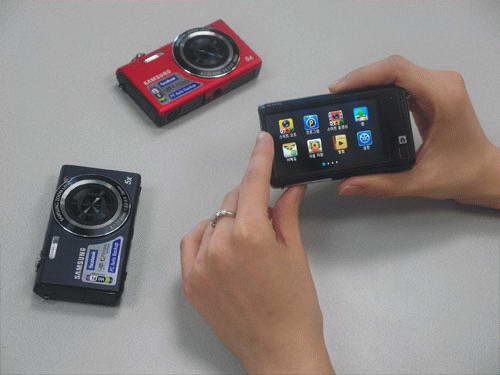
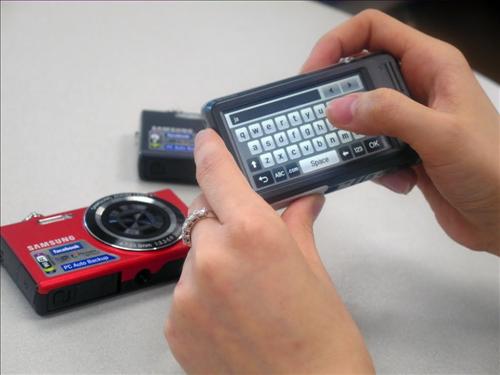
South Korean Electronics giant Samsung Electronics Co. has introduced a new digital camera Samsung SH100 point-and shoot in the local market. The main feature of new Samsung SH100 is Wi-Fi ready and user can upload their photos or videos to online sites such as YouTube, Facebook, Picasa Cyworld, Me2day and e-mail.
Samsung SH100 digital camera will allow users to control camera via smartphone with Remote Viewfinder app.

Samsung SH100 digital camera comes with 3-inch touchscreen display, SoundAlive and different picture modes. it has a features up to 14.2MP resolution image sensor, 26mm wide-angle lens, 5x optical zoom and 720p HD video recording and playback. Samsung SH100 Digital Camera priced at 289,000 won (US$256). You can select one from different three colors Silver, Red or Black.

Read more

0 Get a Wi-Fi multifunction printer for $59


In the market for a new printer? Might as well get one that doubles as a scanner and copier. And one that works without wires.

Wal-Mart has the Lexmark X4650 wireless all-in-one printer for $59. Shipping will run you 97 cents, though you can skip that by opting for store pickup. Either way, plan on paying sales tax.

As most of you know, I hold Wi-Fi printers in the same high regard as chocolate-covered caramels and Jessica Alba. The X4650 connects to your Wi-Fi router for blissfully wireless printing and scanning.

Ironically, Wal-Mart bundles a 10-foot Tripp Lite gold-plated USB cable, just in case you're not planning to go the Wi-Fi route.

The X4650 offers dual-cartridge printing. If you want the best possible photo results, you can swap in a photo-ink cartridge for the black one and enjoy six-color output.

The downside is that, as with most inkjets, cartridges cost a pretty penny. Plan on dropping at least $25 for each replacement--a little less if you go the remanufactured route.

The printer supports all the latest versions of Windows and Mac OS X. Though it lacks fax capabilities, it can scan to your PC's fax modem (if it has one) and also offers a handy scan-to-e-mail option.

In short, it's a fairly basic multifunction printer, one that sold for $130 when it debuted about a year ago. CNET hasn't reviewed it, but the reviews I've seen elsewhere have been mostly positive. (The only real ding is relatively slow printing.)

In any case, $59 for a Wi-Fi-equipped all-in-one is a rare find. Definitely worth considering.

Read more

0 Transcend launches hot-pink music player - MP330 - with FLAC and WAV support

Couldn’t find the perfect gift for your beloved this Valentine’s Day (and are still alive)? Looking to gift or use a hot pink digital music player? If you said yes to any of these questions, then Transcend’s better-late-than never launch of the Digital Player MP330 should interest you greatly.

Available in three capacities – 2GB, 4GB, & 8GB – the Digital Player MP330 is more than just an MP3 player, as it supports a variety of audiophile formats, including WAV and FLAC. It also supports WMA and WMA-DRM10 files. The MP330 player supposedly also features a “high signal-to-noise ratio of over 90dB to deliver superior audio output quality.”

The Digital Player MP330 could be looked at as a value-for-money audiophile device, and apart from wide format support and enhanced audio quality, it offers users up to seven advanced equalizer presets to choose from, as well as a custom, user-defined equalizer.


Sporting USB 2.0 connectivity, the Transcend Digital Player MP330 is priced as seen below:

2GB - Rs. 2,500

4GB - Rs. 2,599

8GB - Rs. 3,415

Read more

0 Sony Dual-View technology aims to make the fight for the remote obsolete

Stereoscopic-displays provide 3D vision by displaying two separate images of the same scene on one screen, one for each eye. Depending on their technology and implementation, viewing angles wary wildly, and though active shutter-glasses technologies don’t really suffer from these obstacles, auto-stereoscopic solutions are still struggling trying to display an identical stereo-image for viewers located in different parts, who now seeing either a mono image, or incorrectly merged stereo-image, in a significant portion of the viewing angles.

It looks like Sony has decided to capitalize on this disadvantage of auto-stereoscopic (glasses-free) display technology in their 3D HDTVs in a novel manner, one that seems obvious in hindsight, and can seriously up the usefulness and interface options of the television.


Called Dual-View technology, Sony will soon offer 3D TVs with the ability to display two separate image from two separate sources, at the same time. What this allows is the ability for individual users to see different images on the screen, simultaneously, when seated at certain angles with respect to the television set. As seen in the image above, the centre view would probably still be blurred when dual-view is switched on.

The technology behind the innovation is still being developed, and not even a tentative date for production was mentioned. Applications are numerous though, and when coupled with dual-headphone or poly-directional audio features, can allow two sets of viewers to watch different channels, at the same time. No more fighting for the remote?

Read more

0 Artis XL USB


features

  • 2.0 Multimedia speakers
  • 600W PMPO
  • Frequency response : 100Hz ~ 20KHz
  • Speaker unit : 2.5" x2
  • Power from USB
  • Best for laptops/desktops
  • Full sound for enriching Mp3/Mp4 audio quality

price :Rs450/-(INR)
Read more

0 Dell V515w All-in-One Wireless Printer


The good: Auto-document feeder; comes with OCR software; impressive black text output speed.

The bad: Dismal image quality; prone to paper jams due to low-output tray capacity; unreliable wireless networking; small two-line LCD.

The bottom line: The Dell V515w is a capable printer with all-in-one print, fax, scan, and copy functionality, but the cheap build, quick-depleting cartridges, and spotty wireless service aren't worth the hassle. We recommend skipping over this ink guzzler and picking up a more reputable multifunction inkjet.


Two years ago Lexmark extended its relationship with Dell to collaborate on a line of inkjet printers that includes this Dell V515w. While Lexmark has a history of satisfactory imaging products, this multifunction all-in-one leaves a lot to be desired. Straight out of the box, the V515w is marred by physical flaws and a bulky design, not to mention a cheap two-line "color" LCD display that looks like it belongs on a low-end graphing calculator instead of a $130 machine. With additional frustrations including frequent paper jams, unreliable wireless connectivity, and expensive ink cartridges, the V515 doesn't have many redeeming factors. You'd be wiser to spend your money on a more capable machine. We recommend the less expensive Epson WorkForce 310 or the slightly pricier Canon Pixma MX870.

Design and features
The Dell V515w's measurements (13.4 inches wide, 19.2 inches long, and 8 inches deep) are about average compared with other multifunction printers we've tested, although it weighs slightly more than average at 17.5 pounds. The top of the printer features a bucket design with a 35-page auto-document feeder that's useful for scanning, copying, and faxing multiple pages. This feature is also convenient for amateur snapshot photographers who can save time with a hands-free way to scan multiple prints in one sitting.

The flatbed scanner lives just underneath the auto-document feeder and can handle up to 1,200x2,400dpi resolution, another standard feature we normally see on multifunction devices. However, Dell deserves recognition for including a copy of the ABBYY FineReader Sprint software on the included driver installation disc that provides basic optical character recognition (OCR) functionality and will do its best to "read" a scanned document and import the text into a word processor of your choosing, typically Microsoft Word. In our testing experience, the software is fairly accurate, although we definitely suggest you check for inaccuracies after the scan completes. Additionally, be sure to hold onto the driver installation disc, as ABBY FineReader Sprint isn't available for download on Dell.com.

The first problem we have with the design of the Dell V515 isn't the oversized design or the scanner bay, but rather the control panel that folds out of the middle of the unit. During installation, we were instructed to install a clear strip of plastic on top of the panel that adds text labels to the Copy, Scan, Fax, and Photo buttons. We're unsure why those labels weren't already printed there, but the extra layer and the mirrored finish take away from the rest of the streamlined design.

Next, the paper path of the V515w starts at the standard 100-sheet paper input tray that folds out of the rear and guides through the printer until it's eventually spit out underneath the control panel where a plastic arm can only corral up to 25 sheets of plain 20 lb. paper. The printer has no problem stacking individual print jobs in the output tray at a time, but we experienced multiple paper jams down there once the number started approaching the 25-sheet limit, whereas the Epson WorkForce 310 can hold double the amount for the same price.

Regardless, we actually prefer the paper handling on the $200 HP Photosmart c6380 that employs two output trays to keep 4x6-inch photos separate from 8.5x11-inch documents.

Like many modern all-in-one printers, the Dell V515w includes an 802.11b/g wireless card that's supposed to help you cut the cord and free up USB ports that would otherwise be used for an inelegant connection to the host computer. The wireless installation disc that comes in the bundle does an adequate job of walking you through the Wi-Fi Protected Setup (WPS) using your wireless router's SSID and WPA password, but our connection kept giving us an error message that said "Cannot Print over a Wireless Network" despite the green notification light that supposedly indicates a solid connection.


Read more

0 Acer new GN245HQ Monitor with Nvidia 3D vision

At last, Acer has released a new Monitor. Well Nvidia is getting more and more popular and many other companies have also started using Nvidia card. This new Acer monitor comes with Nvidia 3D vision support. The main important thing is that it has in-built 3D IR emitters. Well its a technical part and don’t worry if you don’t get it.

The screen is 24” inch and it has 1920×1080 pixel(full HD support) with 102Hz refresh rate. The display has 2ms response time with dual-DVI and HDMI input. So you may easily connect your other devices to your monitor like Blu-ray player. The design is very attractive shinning black.

This model will be released in Europe this February for $585. This time Acer has made something very cool and its a must for every Pro Gamer. It will definitely change your PC experience with its 3D capability.

Read more

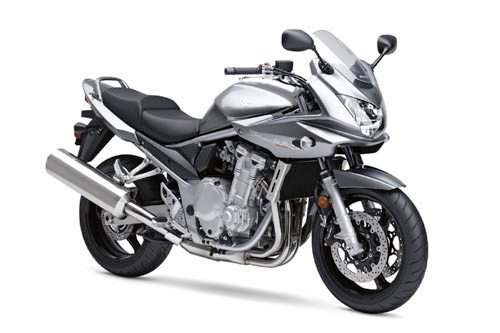
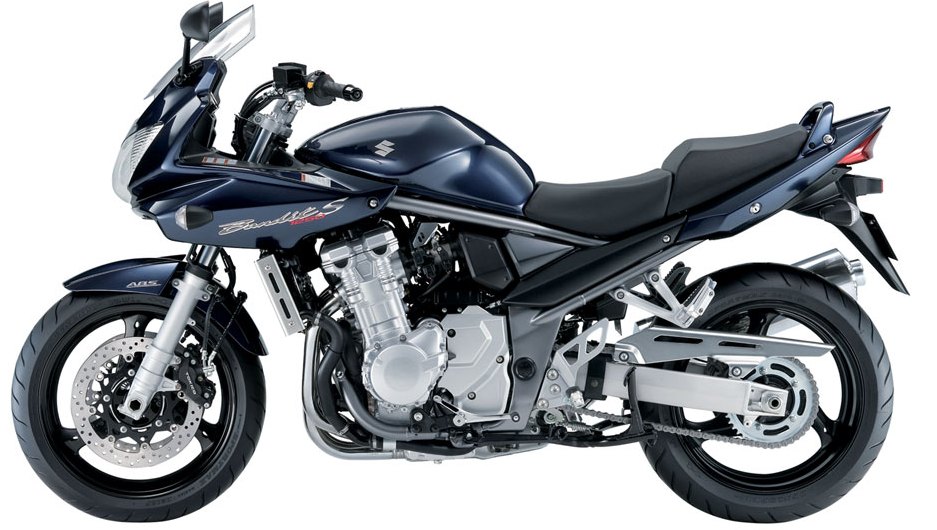
0 Suzuki Bandit 1250s


VEHICLE SUMMARY

Name:Bandit 1250s
Type:Sports

ENGINE SPECIFICATIONS

Displacement:1255cc
Engine:Four-stroke, 4-cylinder, DOHC
Maximum Power:NA
Maximum Torque:NA
Gears:6 Manual
Bore:79
Stroke:64
Cooling Type:Liquid Cooling

DIMENSIONS

Length:2130.00 mm
Width:790.00 mm
Height:1235.00 mm

On Road Price

Rs. 9,36,200
* Mumbai. May vary.


OTHER SPECIFICATIONS

Weight:250.00 kg
Ground Clearance:135.00 mm
Fuel Tank:19.00 ltrs
Wheelbase:1485.00 mm
Wheel Type:Alloys
Wheel Size:120/70 ZR17 - 180/55 ZR17 mm
Tubeless:yes
Colors:Blue

ACTIVE AND PASSIVE SAFETY

Suspension(Front):Telescopic, oil damped, preload adjustable
Suspension(Rear):Link-type suspension
Brakes:Dual hydraulic disc
Brakes(Rear):Single hydraulic disc
Stand Alarm:

COMFORT AND CONVENIENCE

Fuel Guage:Digital
Self Start:yes
Tacho Meter:Analogue
Trip Meter:Digital-2
Alloys:yes
Speedometer:Digital
Step-up Seat:yes
Pass-light:yes
Low Fuel Indicator:yes
Low Oil Indicator:

Passenger Footrest:yes

On Road Price

Rs. 9,36,200
* Mumbai. May vary.

yes
Read more

0 CineMate™ Series II Digital Home Theatre Speaker System


The CineMate™ Series II Digital Home Theatre Speaker System with improved acoustic performance. It’s the easiest way to enjoy Bose® home theatre performance and bring out the full audio potential of your HDTV. Bose proprietary TrueSpace™ surround digital processing circuitry allows two speaker arrays and an Acoustimass® Module to deliver sound that seems to surround you.


Improved acoustic performance
Delivers deeper low notes and more immersive sound.


Brings out the digital audio potential
Enjoy your movies, sports, music and gaming in an absolutely new way.


Proprietary TrueSpace™ digital processing circuitry
Delivers a spacious, multichannel sound experience with strong centre imaging from just two visible speakers and a hideaway Acoustimass® Module.

Acoustimass® Module
Works in concert with the small speakers to deliver a fuller range of theatre sound and effects. The patented Bose design produces low frequencies for all channels with no audible distortion.


Two speaker arrays and hideaway Acoustimass® Module
They are designed to blend elegantly into your room.


Interface Module
Houses two LED indicators and connectors for audio input, and receives IR commands for the speaker system. Connects directly to your TV while providing status information (on/off) for your speaker system.


Sleek four-button remote
Controls power, volume and mute functions in a simplified, streamlined design.

System setup
Consists of only four simple connections. Intuitive one-way connectors eliminate the guesswork often associated with more complex systems.

Digital 5.1 decoding
Provides improved realism from 5.1-encoded DVDs, DBS or HDTV.


Proprietary Videostage® 5 decoding and post-processing circuitry
Combined with digital 5.1 decoding, delivers a high quality, multichannel surround sound experience from practically any source: DVDs, videocassettes, stereo CDs, even older mono TV shows and movies.


Price: Rs 41,513/-
Read more

Delete this element to display blogger navbar

 
Powered by Blogger